




Note
•
EFS (Elastic File System)
◦
Works in multi-AZ
◦
Highly available and scalable, but expensive
◦
Uses POSIX file system (Linux)
◦
scales automatically
•
•
EFS Options: here
Amazon EFS
•
Managed NFS (network file system) that can be mounted on many EC2
•
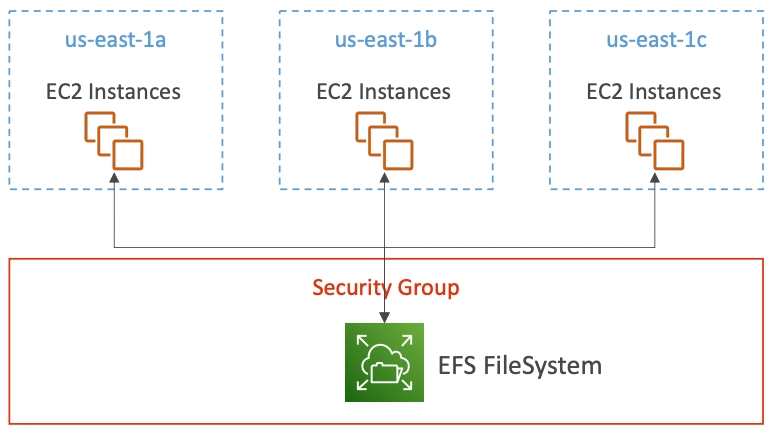
EFS works with EC2 instances in multi-AZ
•
Highly available, scalable, expensive, pay per use
•
Use Cases:
◦
Content management
◦
Web serving
◦
Data sharing
◦
Wordpress
•
Uses NFSv4.1 protocol
•
Uses security group to control access to EFS
•
Compatible with Linux based AMI (not Windows)
•
Encryption at rest using KMS
•
POSIX file system (~Linux) that has a standard file API
•
File system scales automatically, pay-per-use, no capacity planning
EFS - Performance & Storage Classes
•
EFS Scale
◦
1000s of concurrent NFS clients
◦
Grow to Petabyte-scale network file system, automatically
•
Performance Mode (set at EFS creation time)
•
Throughput Mode
◦
Bursting
◦
Provisioned - set your throughput regardless of storage size
◦
Elastic - automatically scales throughput up or down based on your workloads
▪
Up to 3Gib/s for reads and 1GiB/s for writes
▪
Used for unpredictable workloads
EFS - Storage Classes
•
Storage Tiers (lifecycle management feature - move file after N days)
◦
Standard: for frequently accessed files
◦
Infrequent access (EFS-IA): costs to retrieve files, lower price to store. Enables EFS-IA with a Lifecycle Policy
•
Availability and durability
◦
Standard: Multi-AZ, great for production case
◦
One Zone: One AZ, great for development, backup enabled by default, compatible with IA (EFS One Zone-IA)
•
Over 90% in cost savings
