




Note
•
Can run a health check: here
•
Types of AWS Load Balancers: here
•
Sticky Sessions: here
•
Cross Zone Load Balancer: here
•
SSL(TLS) certificates: here
•
SNI can load multiple SSL certificates on one web server
Load Balancing
•
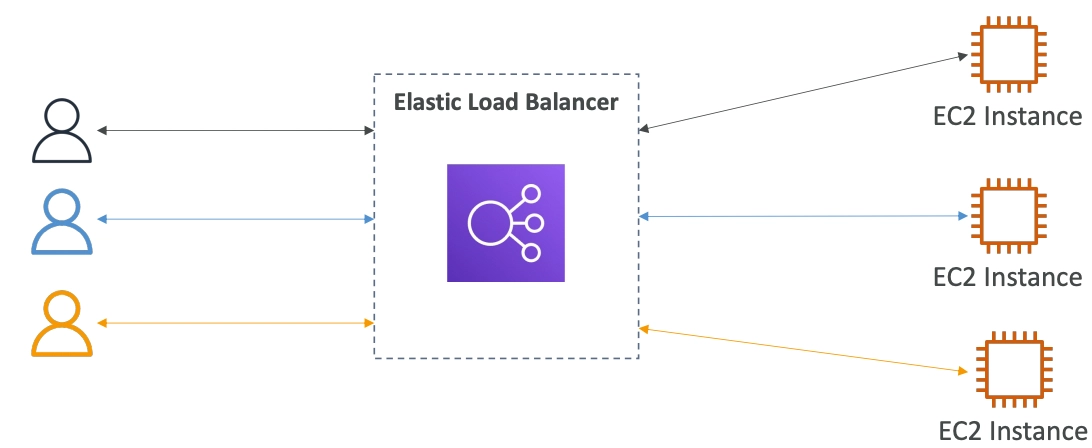
Load Balances are servers that forward traffic to multiple servers downstream
Advantage of Load Balancer
•
Spread load across multiple downstream instances
•
Expose a single point of access (DNS) to your application
•
Seamlessly handle failures of downstream instances
•
Do regular health checks to your instances
•
Provide SSL termination (HTTPS) for your websites
•
Enforce stickiness with cookies
•
High availability across zones
•
Separate public traffic from private traffic
•
It costs less to setup our own load balancer, but it will be a lot more effort at the end
•
Integrated with many AWS offerings / services
Health Checks
•
Health Checks are crucial for Load Balancers
•
They enable the load balancer to know if instances it forwards traffic to are available to reply to requests
•
The health check is done on a port and a route
•
If the response is not 200(OK), then the instance is unhealthy

Types of AWS Load Balancer
•
Classic Load Balancer (v1 - old generation) - 2009 - CLB
◦
HTTP, HTTPS, TCP, SSL (secure TCP)
•
Application Load Balancer (v2 - new generation) - 2016 - ALB
◦
HTTP, HTTPS, WebSocket
•
Network Load Balancer (v2 - new generation) - 2017 - NLB
◦
TCP, TLS (secure TCP), UDP
•
Gateway Load Balancer - 2020 - GWLB
◦
Operates at layer 3 (Network layer) - IP Protocol
•
It is recommended to use the newer generation load balancers due to its various features
•
Some load balancers can be setup as internal (private) or external (public) ELBs
Application Load Balancer (v2)
•
Application load balancers is Layer 7 (HTTP)
•
Load balancing to multiple HTTP applications across machines (target groups)
•
Load balancing to multiple applications on the same machine (ex: containers)
•
Supports for HTTP/2 and WebSocket
•
Support redirects (ex: from HTTP to HTTPS)
•
Routing tables to different target groups:
◦
Routing based on path URL (example.com/users & example.com/posts)
◦
Routing based on hostname in URL (one.example.com & other.example.com)
◦
Routing based on Query String, Headers (example.com/users?id=123&order=false)
•
ALB are a great fit for micro services & container-based application (Docker & ECS)
•
Has a port mapping feature to redirect to a dynamic port in ECS
•
In comparison, we’d need multiple Class Load Balancer per application
•
The application servers don’t see the IP of the client directly
◦
The true IP of the client is inserted in the header X-Forwarded-For
◦
We can also get Port (X-Forwarded-Port) and proto (X-Forwarded-Proto)
•
Target groups can be …
◦
EC2 instances (can be managed by an Auto Scaling Group) - HTTP
◦
ECS tasks (managed by ECS itself) - HTTP
◦
Lambda functions - HTTP request is translated into a JSON event
◦
IP Addresses - must be private IPs
Network Load Balancer (v2)
•
Network load balancers (Layer 4) allow to:
◦
Forward TCP & UDP traffic to your instances
◦
Handle millions of request per seconds (High performance)
◦
Less latency ~100ms (vs 400ms for ALB)
◦
NLB has one static IP per AZ, and supports assigning Elastic IP
◦
NLB are used for extreme performance, TCP or UDP traffic
◦
Not included in the AWS free tier
•
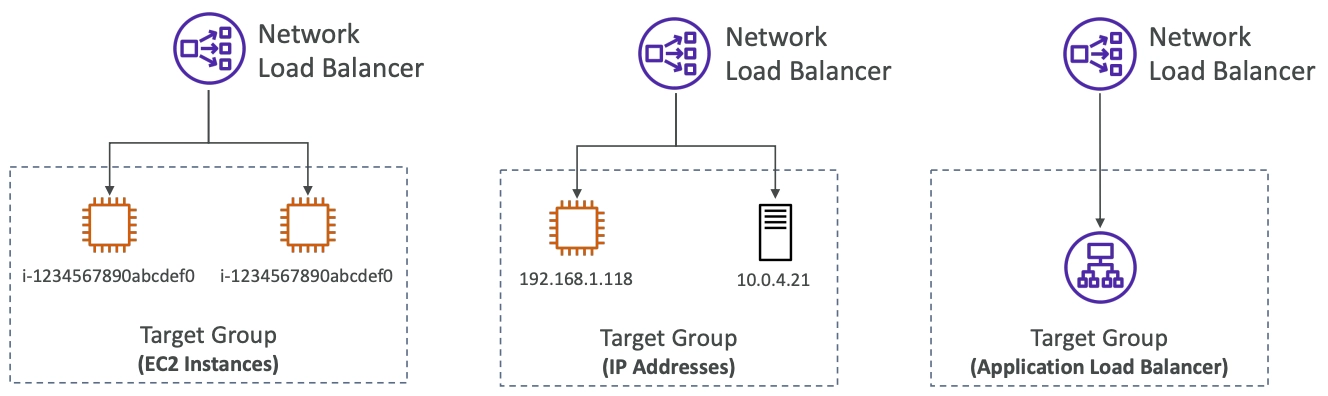
Target Groups
◦
EC2 instances
◦
IP Addresses - must be private IPs
◦
Application Load Balancer
◦
Health Checks supports the TCP, HTTP, and HTTPS Protocols
Gateway Load Balancer
•
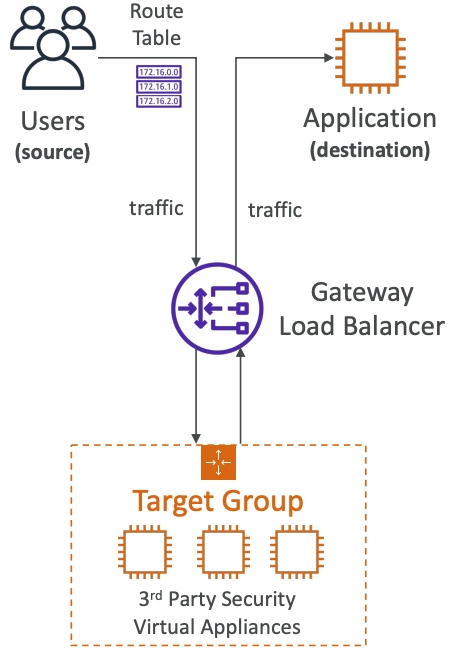
Deploy, scale, and manage a fleet of 3rd party network virtual appliances in AWS
•
Example: Firewalls, Intrusion Detection and Prevention Systems, Deep Packet Inspection Systems, payload manipulation, …
•
Operates at Layer 3 (Network Layer) - IP Packets
•
Combines the following functions:
◦
Transparent Network Gateway - single entry/exit for all traffic
◦
Load Balancer - distributes to your virtual appliances
•
Uses the GENEVE protocol on port 6081
•
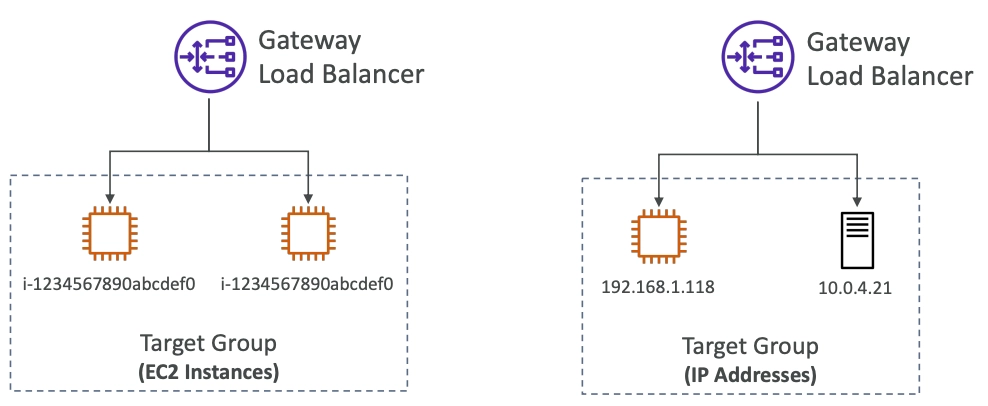
Target Groups…
◦
EC2 instances
◦
IP Addresses - must be private IPs
Sticky Sessions (Session Affinity)
•
It is possible to implement stickiness so that the same client is always redirected to the same instance behind a load balancer
•
This works for Classic Load Balancers & Application Load Balancers
•
The “cookie” used for stickiness has an expiration date you control
•
Use case: make sure the user doesn’t lose his session data
•
Enabling stickiness may bring imbalance to the load over the backend EC2 instances

Sticky Sessions - Cookie Names
•
Application-based Cookies
◦
Custom cookie
▪
Generated by the target
▪
Can include any custom attributes required by the application
▪
Cookie name must be specified individually for each target group
▪
Don’t use AWSALB, AWSALBAPP, or AWSALBTG (reserved for use by the ELB)
◦
Application cookie
▪
Generated by the load balancer
▪
Cookie name is AWSALBAPP
•
Duration-based Cookies
◦
Cookie generated by the load balancer
◦
Cookie name is AWSALB for ALB, AWSELB for CLB
Cross-Zone Load Balancing
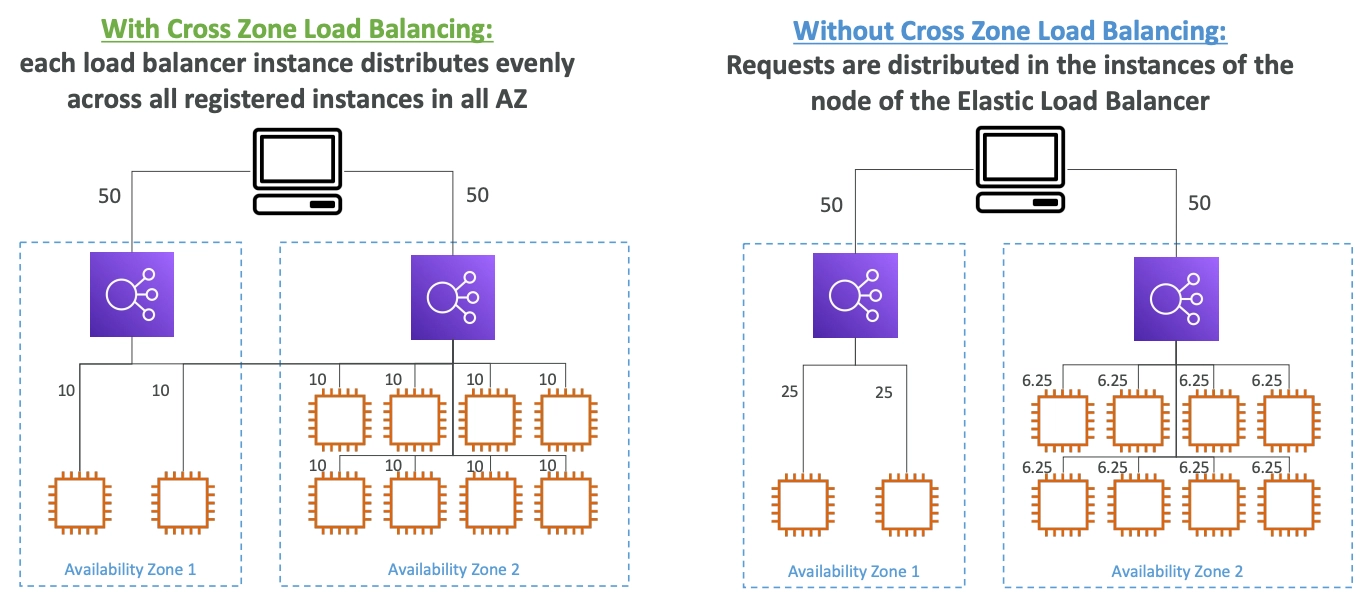
Cross-Zone Load Balancing
•
Application Load Balancer
◦
Enabled by default (can be disabled at the Target Group level)
◦
No charges for inter AZ data
•
Network Load Balancer & Gateway Load Balancer
◦
Disabled by default
◦
Pay charges for inter AZ data if enabled
•
Classic Load Balancer
◦
Disabled by default
◦
No charges for inter AZ data if enabled
SSL/TLS - Basics
•
AN SSL Certificate allows traffic between your clients and your load balancer to be encrypted in transit (in-flight encryption)
•
SSL refers to Secure Sockets Layer, used to encrypt connections
•
TLS refers to Transport Layer Security, which is a newer version
•
Nowadays, TLS certificates are mainly used, but people still refer as SSL
•
Public SSL certificates are issued by Certificate Authorities (CA)
•
Comodo, Symantec, GoDaddy, GlobalSign, Digicert, Letsencrypt, etc…
•
SSL certificates have an expiration date (you set) and must be renewed
SSL(TLS) Certificates

•
The load balancer uses an X.509 certificates (SSL/TLS server certificate)
•
You can manage certificates using ACM (AWS Certificate Manager)
•
You can create upload your own certificates alternatively
•
HTTPS listener:
◦
You must specify a default certificate
◦
You can add an optional list of certs to support multiple domains
◦
Clients can use SNI (Server Name Indication) to specify the hostname they reach
◦
Ability to specify a security policy to support older versions of SSL / TLS (legacy clients)
SSL(TLS) - Server Name Indication
•
SNI solves the problem of loading multiple SSL certificates onto one web server (to serve multiple websites)
•
It’s a “newer” protocol, and requires the client to indicate the hostname of the target server in the initial SSL handshake
•
The server will then find the correct certificate, or return the default one
•
Only works for ALB & NLB, CloudFront but not for CLB
Elastic Load Balancers - SSL(TLS) Certificates
•
Classic Load Balancer (v1)
◦
Support only one SSL certificate
◦
Must use multiple CLB for multiple hostname with multiple SSL certificates
•
Application Load Balancer (v2)
◦
Supports multiple listeners with multiple SSL certificates
◦
Uses Server Name Indication (SNI) to make it work
•
Network Load Balancer (v2)
◦
Supports multiple listeners with multiple SSL certificates
◦
Uses Server Name Indication (SNI) to make it work
Connection Draining
•
Feature naming
◦
Connection Draining - CLB
◦
Connection Delay - ALB & NLB
•
Time to complete “in-flight requests” while the instance is de-registering or unhealthy
•
Stops sending new requests to the EC2 instance which is de-registering
•
Between 1 to 3600 seconds
•
Can be disabled
•
Set to a low value if your request are short
