Note
•
RDS (Relational Database Service)
•
RDS is a managed SQL DB service
•
Multi AZ setup for DR (Disaster Recovery)
•
Have to set Maximum Storage Threshold
•
Read Replicas: here
•
Multi-AZ setup: here
•
Amazon RDS Proxy: here
RDS
•
It’s a managed DB service for DB that use SQL as a query language
•
It allows you to create databases in the cloud that are managed by AWS
◦
Postgres
◦
MySQL
◦
MariaDB
◦
Oracle
◦
Microsoft SQL Server
◦
Aurora (AWS Proprietary database)
Advantage over using DB on EC2
•
RDS is a managed service:
◦
Automated provisioning, OS patching
◦
Continuous backups and restore to specific timestamp
◦
Monitoring dashboards
◦
Read replicas for improved read performance
◦
Multi AZ setup for DR (Disaster Recovery)
◦
Maintenance windows for upgrades
◦
Scaling capability (vertical and horizontal)
◦
Storage backed by EBS (gp2 or io1)
•
But you can’t SSH into your instances
RDS - Storage Auto Scaling
•
Helps you increase storage on your RDS DB instance dynamically
•
When RDS detects you are running out of free database storage, it scales automatically
•
Avoid manually scaling your database storage
•
You have to set Maximum Storage Threshold (Maximum limit for DB storage)
•
Automatically modify storage if:
◦
Free storage is less than 10% of allocated storage
◦
Low-storage lasts at least 5 minutes
◦
6 hours have passed since last modification
•
Useful for applications with unpredictable workloads
•
Supports all RDS database engines
Read Replicas for read scalability
•
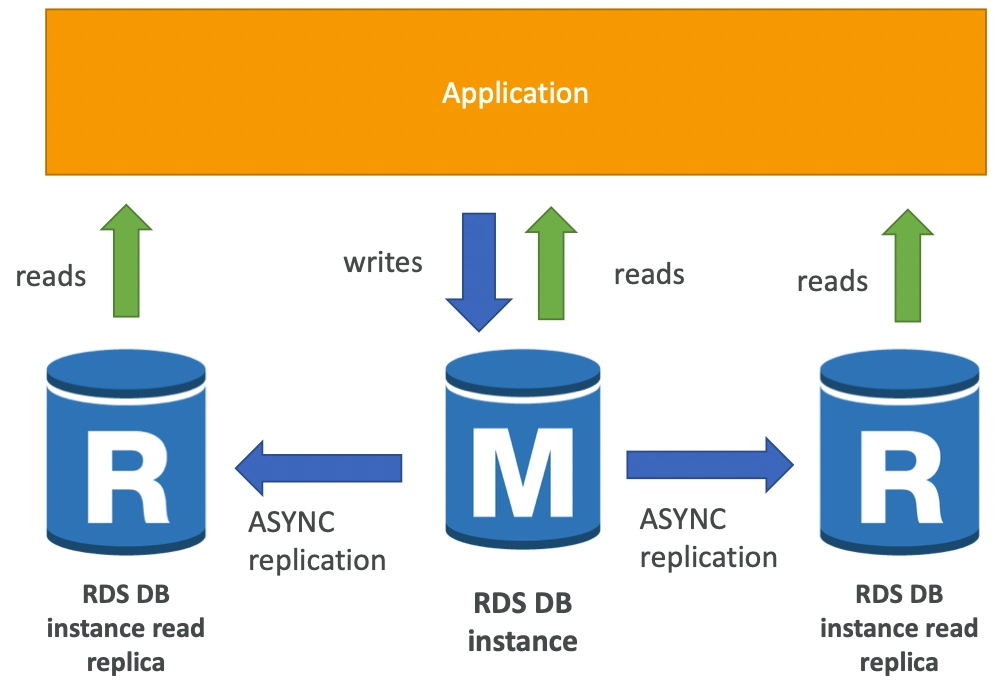
Up to 5 Read Replicas
•
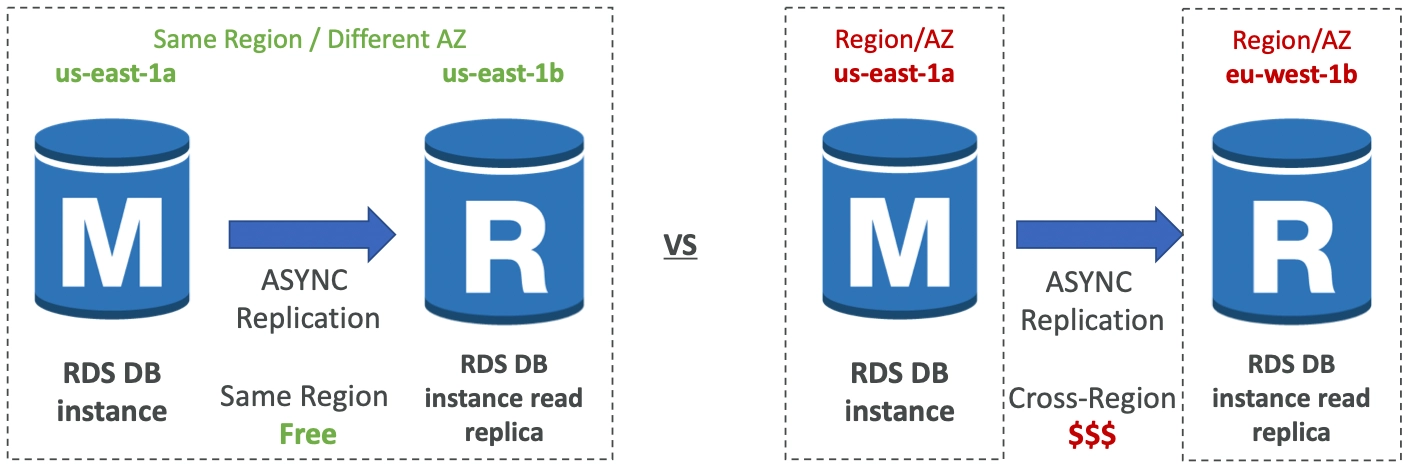
Within AZ, Cross AZ or Cross Region
•
Replication is ASYNC, so reads are eventually consistent
•
Replicas can be promoted to their own DB
•
Applications must update the connection string to leverage read replicas
Read Replicas - Use Cases
•
You have a production DB that is taking on normal load
•
You want to run a reporting application to run some analytics
•
You create a Read Replica to run the new workload there
•
Read replicas are used for SELECT (=read) only kind of statements (not INSERT, UPDATE, DELETE)
Network Cost
•
In AWS there’s a network cost when data goes from one AZ to another
•
For RDS Read Replicas within the same region, you don’t pay that fee
RDS Multi AZ (Disaster Recovery)
•
SYNC replication
•
One DNS name - automatic app failover to standby
•
Increase availability
•
Failover in case of loss of AZ, loss of network, instance or storage failure
•
No manual intervention in apps
•
Not used for scaling
•
You can set Read Replicas as Multi AZ for disaster recovery
RDS - From Single-AZ to Multi-AZ
•
Zero downtime operation (no need to stop the DB)
•
Just click on “modify” for the database and enable “Multi AZ”
•
The following happens internally
◦
A snapshot is taken
◦
A new DB is restored from the snapshot in a new AZ
◦
Synchronization is established between the two databases
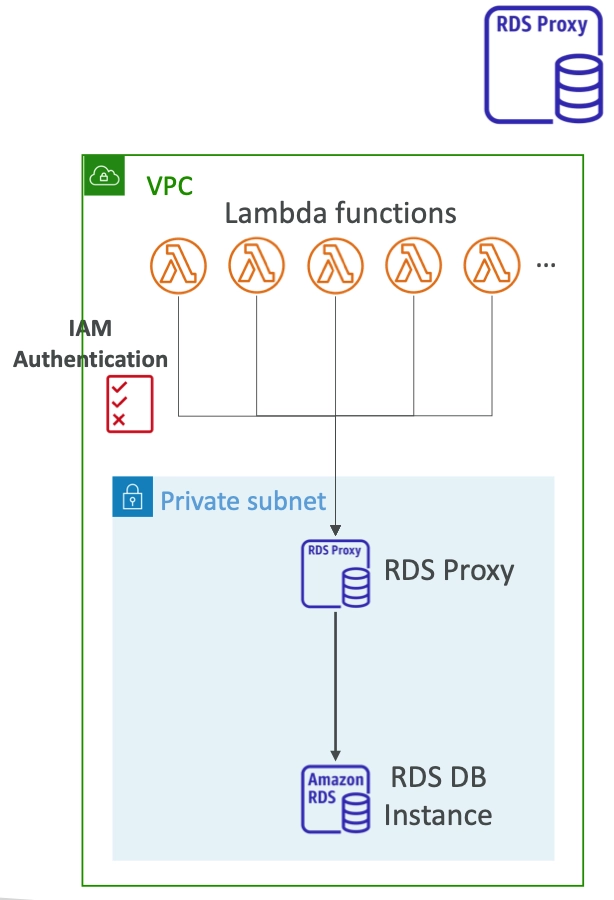
Amazon RDS Proxy
•
Fully managed database proxy for RDS
•
Allows apps to pool and share DB connections established with the database
•
Improving database efficiency by reducing the stress on database resources and minimize open connections
•
Serverless, autoscaling, highly available (multi-AZ)
•
Reduced RDS & Aurora failover time by up 66%
•
Supports RDS and Aurora
•
No code changes required for most apps
•
Enforce IAM Authentication for DB, and securely store credentials in AWS Secrets Manager
•
RDS Proxy is never publicly accessible (must be accessed from VPC)