



Note
•
Proprietary technology from AWS
•
Aurora DB supports
◦
Postgres
◦
MySQL
•
More costly than RDS (20% more)
•
Automated failover for master in less than 30 seconds
•
Security: here
Aurora
•
Aurora is a proprietary technology from AWS (not open sourced)
•
Postgres and MySQL are both supported as Aurora DB (which means your drivers will work as if Aurora was a Postgres or MySQL database)
•
Aurora is “AWS cloud optimized” and claims 5x performance improvement over MySQL on RDS, over 3x the performance of Postgres on RDS
•
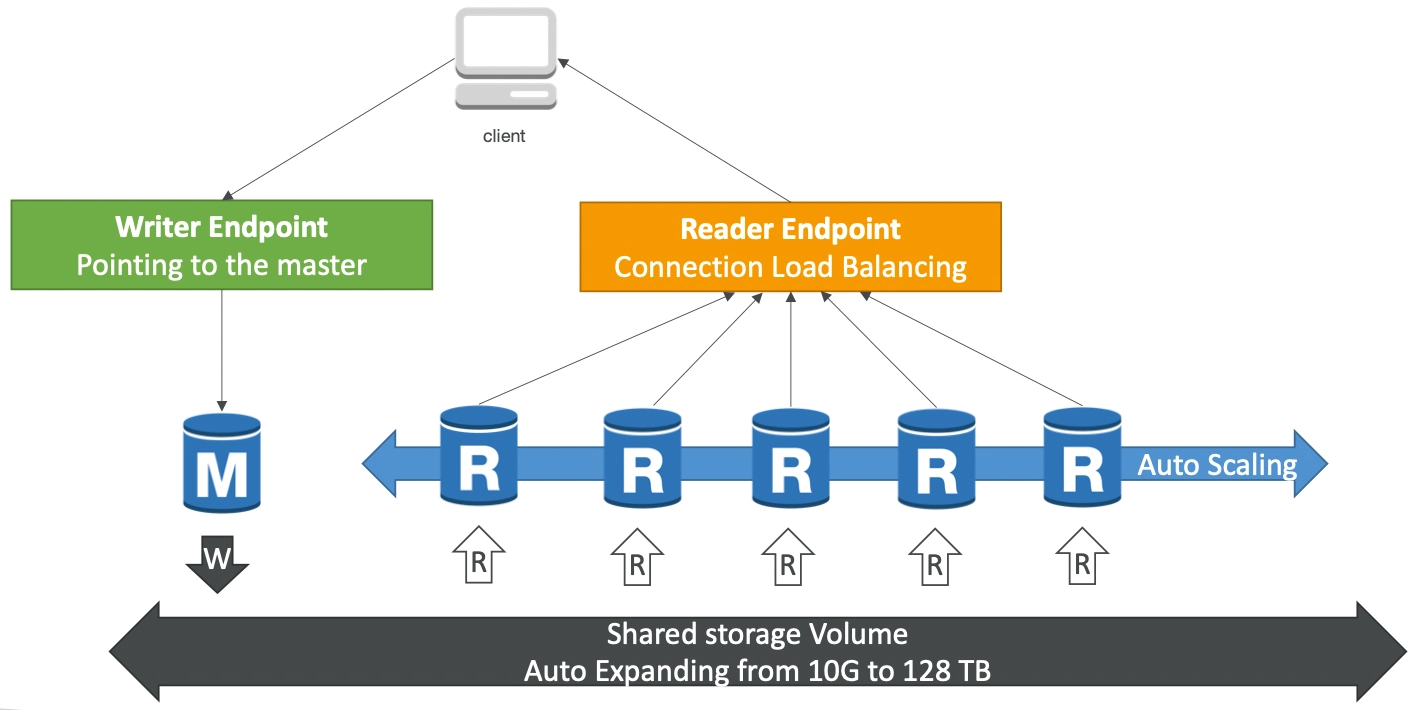
Aurora storage automatically grows in increments of 10GB, up to 128TB.
•
Aurora can have up to 15 replicas and the replication process is faster than MySQL (sub 10ms replica lag)
•
Failover in Aurora is instantaneous. It’s HA (High Availability) native.
•
Aurora costs more than RDS (20% more) - but is more efficient
High Availability and Read Scaling
•
6 copies of your data across 3 AZ:
◦
4 copies out of 6 needed for writes
◦
3 copies out of 6 need for reads
◦
Self healing with peer-to-peer replication
◦
Storage is striped across 100s of volumes
•
One Aurora Instance takes writes (master)
•
Automated failover for master in less than 30 seconds
•
Master + up to 15 Aurora Read Replicas serve reads
•
Support for Cross Region Replication
Aurora DB Cluster
Feature of Aurora
•
Automatic fail-over
•
Backup and Recovery
•
Isolation and security
•
Industry compliance
•
Push-button scaling
•
Automated Patching with Zero Downtime
•
Advanced Monitoring
•
Routine Maintenance
•
Backtrack: restore data at any point of time without using backups
RDS & Aurora Security
•
At-rest encryption:
◦
Database master & replicas encryption using AWS KMS - must be defined at launch time
◦
If the master is not encrypted, the read replicas cannot be encrypted
◦
To encrypt an un-encrypted database, go through a DB snapshot & restore as encrypted
•
In-flight encryption: TLS-ready by default, use the AWS TLS root certificates client-side
•
IAM Authentication: IAM roles to connect to your database (instead of username/pw)
•
Security Groups: Control Network access to your RDS / Aurora DB
•
No SSH available except on RDS Custom
•
Audit Logs can be enabled and sent to CloudWatch Logs for longer retention
