

Problem
To use HTTP protocol in Flutter, there are few settings to go through. However, it is recommended to use HTTPS method unless it’s necessary.
Platform-Specific Notes
Use HTTPS for normal application traffic. The older snippets below are configuration fragments, not a complete production setup. Keep any development exception as narrow as possible and review it before release.
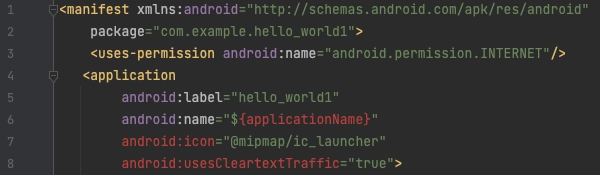
Android: INTERNET permission and cleartext policy are separate settings. The usesCleartextTraffic attribute belongs on the application element, not inside uses-permission. Prefer a domain-specific Network Security Configuration when a development endpoint genuinely requires HTTP.
iOS: NSAllowsArbitraryLoadsInWebContent applies to web views without changing URLSession connections. It is not a general switch for all HTTP clients. Check the ATS exception that applies to the actual networking API and OS version; do not disable certificate verification to hide a connection error.
Solution for IOS
1.
move to ios/Runner/Info.plist
2.
paste the code below
50 <key>NSAppTransportSecurity</key>
51 <dict>
52 <key>NSAllowsLocalNetworking</key>
53 <true/>
54 <key>NSAllowsArbitraryLoadsInWebContent</key>
55 <true/>
Plain Text
복사

Solution for Android
1.
move to android/app/src/main/AndroidManifest.xml
2.
paste the code below
3 <uses-permission android:name="android.permission.INTERNET"
8 android:usesCleartextTraffic="true"
XML
복사