





Requirements

To follow this setup, it is required to have following …
•
No Requirements
Branch [git branch]
Definition
Synopsis [git branch --<synopsis>]
git branch
[--color[=<when>] | --no-color]
[--show-current]
[-v [--abbrev=<n> | --no-abbrev]]
[--column[=<options>] | --no-column]
[--sort=<key>]
[--merged [<commit>]]
[--no-merged [<commit>]]
[--contains [<commit>]]
[--no-contains [<commit>]]
[--points-at <object>]
[--format=<format>]
[(-r | --remotes) | (-a | --all)]
[--list]
[<pattern>…]
git branch [--track[=(direct|inherit)] | --no-track] [-f] [--recurse-submodules] <branchname> [<start-point>]
git branch (--set-upstream-to=<upstream> | -u <upstream>) [<branchname>]
git branch --unset-upstream [<branchname>]
git branch (-m | -M) [<oldbranch>] <newbranch>
git branch (-c | -C) [<oldbranch>] <newbranch>
git branch (-d | -D) [-r] <branchname>…
git branch --edit-description [<branchname>]
YAML
복사
SourceTree
1.
Click Branch from the Toolbar

2.
Type new name on New Branch
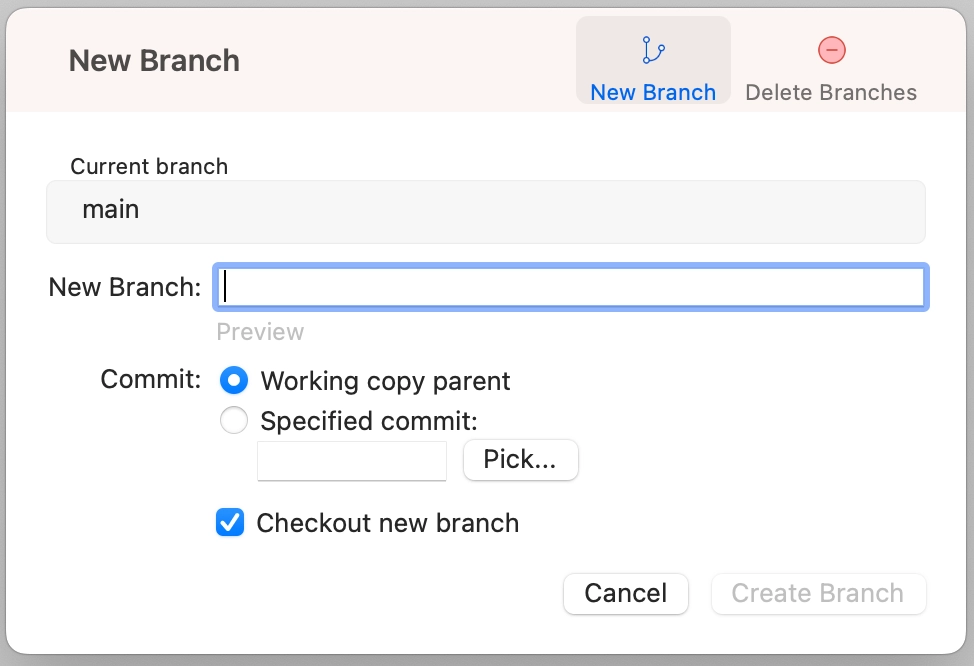
3.
Click Create Branch
Commonly Used Commands
•
Create new branch
◦
git branch <branch name>
◦
git switch -c <branch name>
•
Change branch name
◦
git branch -m <old name> <new name>
•
Delete branch
◦
git branch -d <branch name>
◦
git branch -D <branch name>
•
Delete remote branch
◦
git push <remote name> --delete <branch name>
•
Switch head to the certain branch
◦
git switch <branch name>
•
Switch head to the remote branch
◦
git switch -t <remote name/branch name>
•
Push new branch to remote repository
◦
git push -u origin <branch name>
