





Requirements

To follow this setup, it is required to have following …

Rebase [git rebase]
The commits that were previously saved into the temporary area are then reapplied to the current branch, one by one, in order. Note that any commits in HEAD which introduce the same textual changes as a commit in HEAD..<upstream> are omitted (i.e., a patch already accepted upstream with a different commit message or timestamp will be skipped).
Synopsis [git rebase --<synopsis>]
git rebase [-i | --interactive] [<options>] [--exec <cmd>]
[--onto <newbase> | --keep-base] [<upstream> [<branch>]]
git rebase [-i | --interactive] [<options>] [--exec <cmd>] [--onto <newbase>]
--root [<branch>]
git rebase (--continue | --skip | --abort | --quit | --edit-todo | --show-current-patch)
YAML
복사
SourceTree
Recommend to use CLI
1.
Move to the target branch by double clickiing the branch
2.
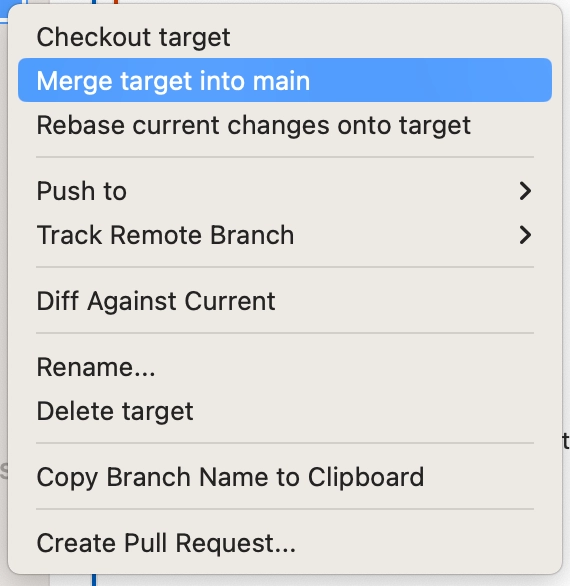
Right click on the main branch
3.
Click Rebase current changes onto <main branch>

4.
Move to the main branch
5.
Right click on the target branch
6.
Click Merge <target branch> into <main branch>
Commonly Used Commands
1.
Move to the target branch
2.
git rebase <main branch name>
•
Resolve git rebase conflict
1.
Resolve error
2.
git add .
3.
git rebase --continue
•
Rebort git rebase
◦
git rebase --rebort
Edit past commits
1.
git rebase -i <one previous hash address>
•
Rename
1.
edit pick to r
•
Squash
1.
edit pick to s on the one commit ahead
2.
delete message #2 and edit message #1
•
Separate
1.
edit pick to e
2.
Repeat
a.
git reset --mixed HEAD^
b.
git add <file name>
c.
git commit -m "<Message>"
3.
git rebase --continue
•
Delete
1.
edit pick to d
