





Requirements

To follow this setup, it is required to have following …
•
No Requirements
Pull [git pull]
Incorporates changes from a remote repository into the current branch. If the current branch is behind the remote, then by default it will fast-forward the current branch to match the remote. If the current branch and the remote have diverged, the user needs to specify how to reconcile the divergent branches with --rebase or --no-rebase (or the corresponding configuration option in pull.rebase).
More precisely, git pull runs git fetch with the given parameters and then depending on configuration options or command line flags, will call either git rebase or git merge to reconcile diverging branches.
Synopsis [git pull --<synopsis>]
git pull [<options>] [<repository> [<refspec>…]]
YAML
복사
SourceTree
1.
Move to the desired branch
2.
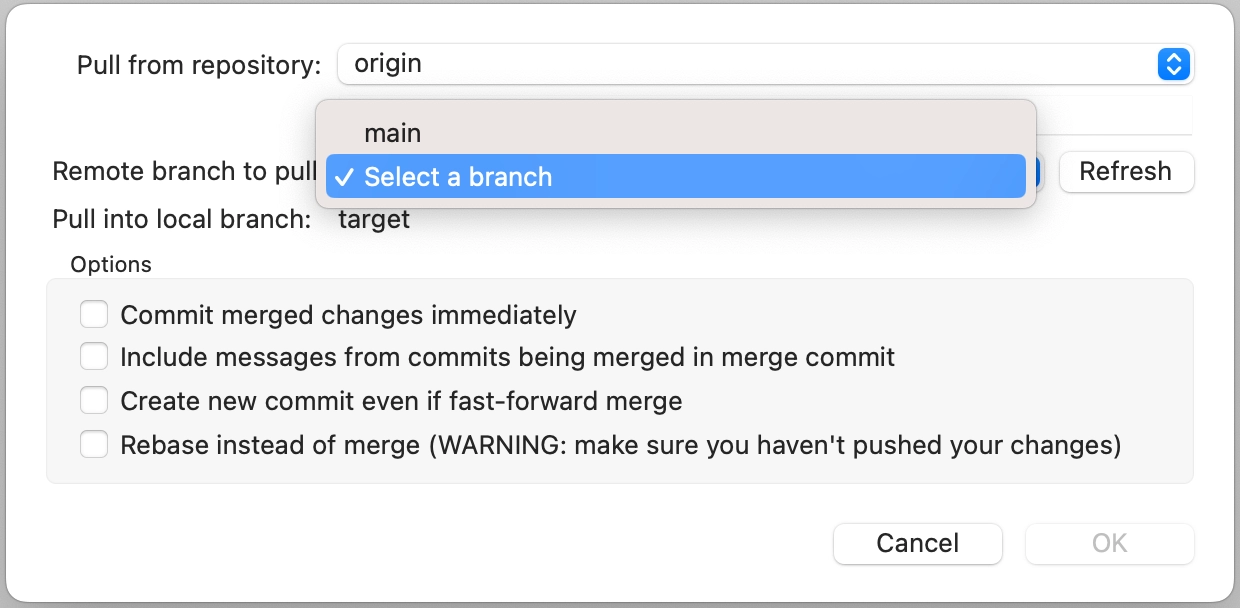
Click Pull from the toolbar

3.
Select the desired branch and confirm
Commonly Used Commands
1.
git pull
•
•
•
Push local forcefully to resolve conflict
1.
git push --force
